Regular Tasks
This section delves into the origins of common Gradle tasks and their underlying relationships.
The Base Plugin
Taking the commonly used buildSrc build environment as an example, the contents of a build.gradle(.kts) file and the executable tasks don't solely originate from the Gradle Java Plugin. Often, they are a combination of multiple plugins.
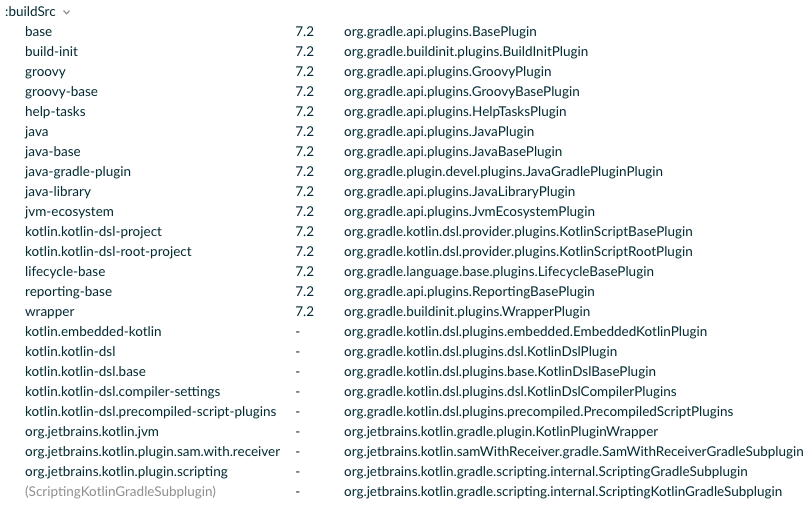
The Base Plugin is one of the most fundamental plugins in Gradle, primarily known for defining several common lifecycle tasks:
- "The Base Plugin"@Gradle: Offers a comprehensive understanding of the Base Plugin, including the basic tasks mentioned later.
- "Lifecycle tasks"@Gradle: Details what lifecycle tasks are.
In Android development, frequently used CLI tasks are extensions of these nodes:
cleancheckassemblebuildbuildConfigurationcleanTask
The remaining configurations, such as archiveBaseName and archiveVersion in BasePluginExtension, are often used as default names for artifacts in other plugins.
base {
    archivesName.set("gradle")
}
The Java Plugin
As mentioned earlier, the Java Plugin internally also utilizes the Base Plugin:
public class JavaPlugin implements Plugin<Project> {
    @Override
    public void apply(final Project project) {
        ...
        final ProjectInternal projectInternal = (ProjectInternal) project;
        project.getPluginManager().apply(JavaBasePlugin.class);
        ...
    }
}
public class JavaBasePlugin implements Plugin<Project> {
    @Override
    public void apply(final Project project) {
        ProjectInternal projectInternal = (ProjectInternal) project;
        project.getPluginManager().apply(BasePlugin.class);
        project.getPluginManager().apply(JvmEcosystemPlugin.class);
        project.getPluginManager().apply(ReportingBasePlugin.class);
        ...
    }
}
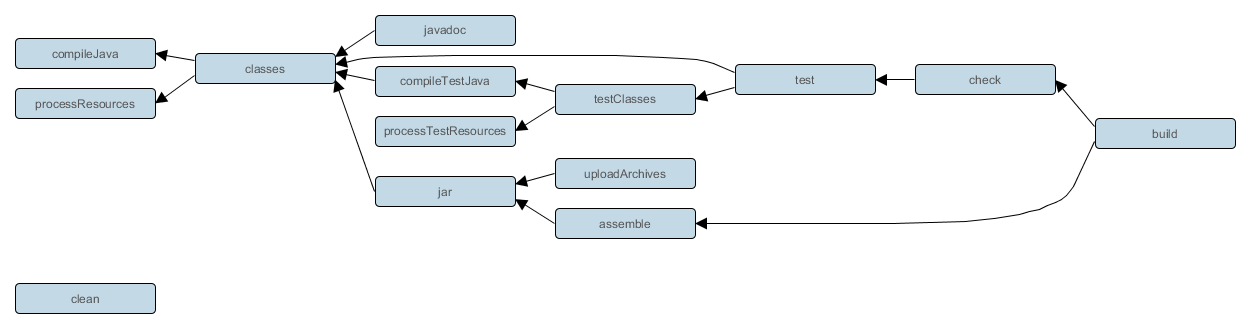
Additionally, it expands tasks, SourceSets, and Dependency Configurations commonly seen in Android development:
- "The Java Plugin"@Gradle: Provides a full understanding of the Java Plugin, which is also beneficial for grasping the Android Gradle Plugin.
The Android Gradle Plugin (AGP)
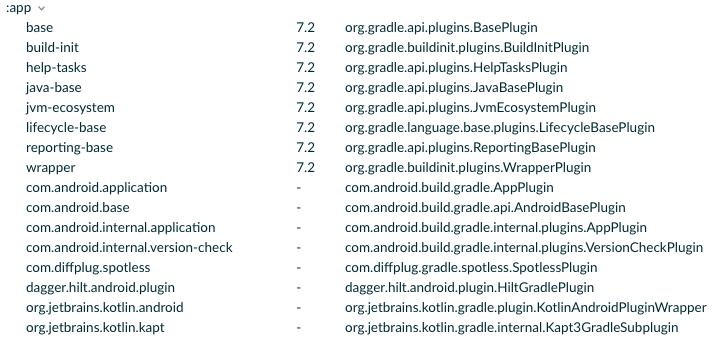
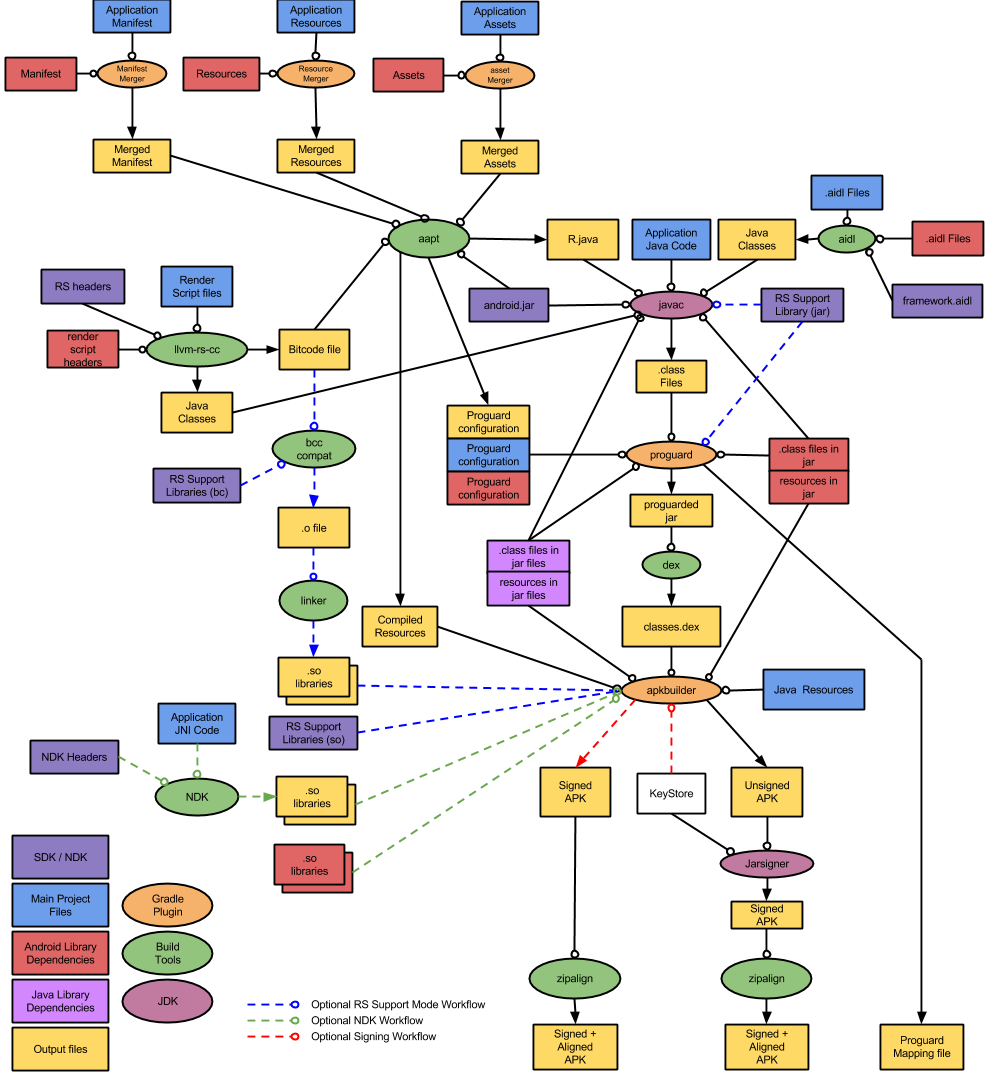
A typical Android Application module contains multiple plugins. The inclusion of numerous resource files and the addition of BuildTypes and Variants result in a significant increase in the number of tasks. Before diving into specific tasks, it's beneficial to understand the Android Build Workflow:
Common commands include assembleDebug, clean, and testDebug. For example, running ./gradlew clean :app:assembleDebug --dry-run on a fresh Android Application project will show the required tasks and their execution order.
$ ./gradlew clean :app:assembleDebug --dry-run

:clean SKIPPED
:app:clean SKIPPED
:app:preBuild SKIPPED
:app:preDebugBuild SKIPPED
:app:compileDebugAidl SKIPPED
:app:compileDebugRenderscript SKIPPED
:app:generateDebugBuildConfig SKIPPED
:app:checkDebugAarMetadata SKIPPED
:app:generateDebugResValues SKIPPED
:app:generateDebugResources SKIPPED
:app:mergeDebugResources SKIPPED
:app:packageDebugResources SKIPPED
:app:parseDebugLocalResources SKIPPED
:app:createDebugCompatibleScreenManifests SKIPPED
:app:extractDeepLinksDebug SKIPPED
:app:processDebugMainManifest SKIPPED
:app:processDebugManifest SKIPPED
:app:processDebugManifestForPackage SKIPPED
:app:processDebugResources SKIPPED
:app:compileDebugKotlin SKIPPED
:app:javaPreCompileDebug SKIPPED
:app:compileDebugJavaWithJavac SKIPPED
:app:mergeDebugShaders SKIPPED
:app:compileDebugShaders SKIPPED
:app:generateDebugAssets SKIPPED
:app:mergeDebugAssets SKIPPED
:app:compressDebugAssets SKIPPED
:app:processDebugJavaRes SKIPPED
:app:mergeDebugJavaResource SKIPPED
:app:checkDebugDuplicateClasses SKIPPED
:app:desugarDebugFileDependencies SKIPPED
:app:mergeExtDexDebug SKIPPED
:app:mergeLibDexDebug SKIPPED
:app:dexBuilderDebug SKIPPED
:app:mergeProjectDexDebug SKIPPED
:app:mergeDebugJniLibFolders SKIPPED
:app:mergeDebugNativeLibs SKIPPED
:app:stripDebugDebugSymbols SKIPPED
:app:validateSigningDebug SKIPPED
:app:writeDebugAppMetadata SKIPPED
:app:writeDebugSigningConfigVersions SKIPPED
:app:packageDebug SKIPPED
:app:createDebugApkListingFileRedirect SKIPPED
:app:mergeDebugNativeDebugMetadata SKIPPED
:app:assembleDebug SKIPPED
Unfortunately, it's not feasible to display all task dependencies here, but there are two common methods to view the dependency tree:
Use the
--scanfeature’s Timeline, which allows you to see the preceding and succeeding tasks for each executed task:Shell$ ./gradlew clean :app:assembleDebug --scan
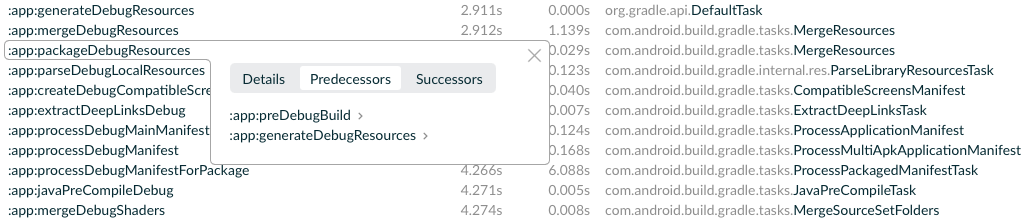
- Use a task analysis plugin to export textual or visual dependency relationships, such as "gradle-taskinfo"barfuin:
$ ./gradlew tiTree assemble

:assemble                             (org.gradle.api.DefaultTask)
+--- :jar                             (org.gradle.api.tasks.bundling.Jar)
|    `--- :classes                    (org.gradle.api.DefaultTask)
|         +--- :compileJava           (org.gradle.api.tasks.compile.JavaCompile)
|         `--- :processResources      (org.gradle.language.jvm.tasks.ProcessResources)
+--- :javadocJar                      (org.gradle.api.tasks.bundling.Jar)
|    `--- :javadoc                    (org.gradle.api.tasks.javadoc.Javadoc)
|         `--- :classes               (org.gradle.api.DefaultTask)
|              +--- :compileJava      (org.gradle.api.tasks.compile.JavaCompile)
|              `--- :processResources (org.gradle.language.jvm.tasks.ProcessResources)
`--- :sourcesJar                      (org.gradle.api.tasks.bundling.Jar)
This plugin will provide a detailed tree structure of task dependencies.
For a quick overview of tasks' implementation, refer to the analysis based on AGP 3.0.1 "Analysis of Major Tasks in Android Gradle Plugin"@ZYLAB (in Simplified Chinese).
Summary
- Beginners should start with a simple model to understand Gradle tasks, as diving directly into the complex array of AGP tasks can be overwhelming.
- The concept of lifecycle tasks is both simple and useful. Custom tasks can also flexibly extend more lifecycle tasks for enhanced functionality.